This article describes What Is the Facebook Pixel Code How to Get It? topics.
What is Facebook Pixel Code
According to Facebook's own definition;
It's an analytics tool that lets you measure the effectiveness of your ads by understanding the actions people take on your website.
Make sure your ads are shown to the right people.
You can find new customers, as well as people who visited a specific page on your website or took an action of your choice.
It helps you increase your sales.
With automated bidding, you'll reach people who are more likely to take an action you care about, like buying a product.
You can measure the results of your ads.
By measuring what happens when people see your ad, you better understand the impact of your ads.
How to Get a Facebook Pixel code
You need to log in with your facebook account from the https://business.facebook.com/ link.
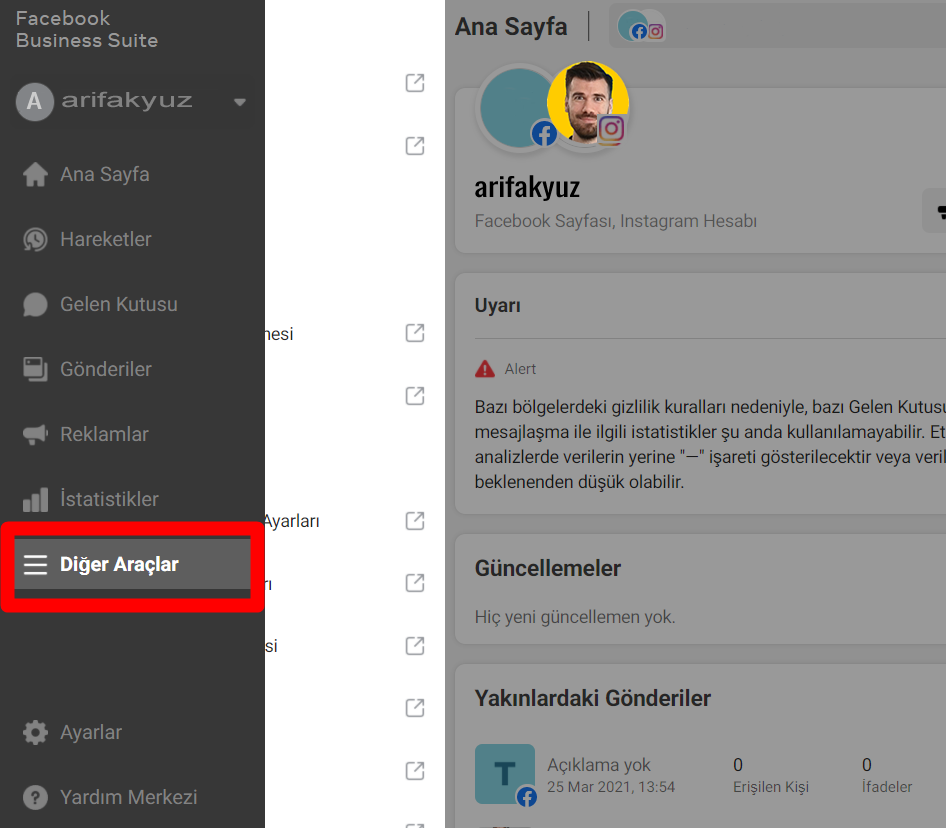
You need to switch from the Other tools area to the Incident manager.

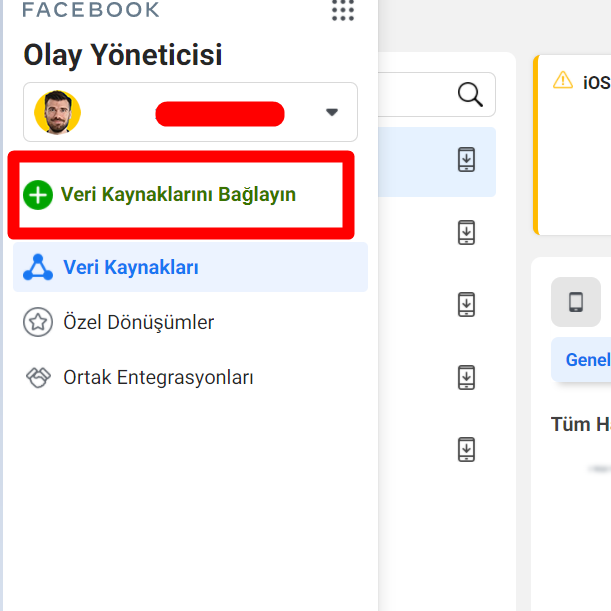
In event management, you can select Pixel by saying Connect Data Sources from the menu area.
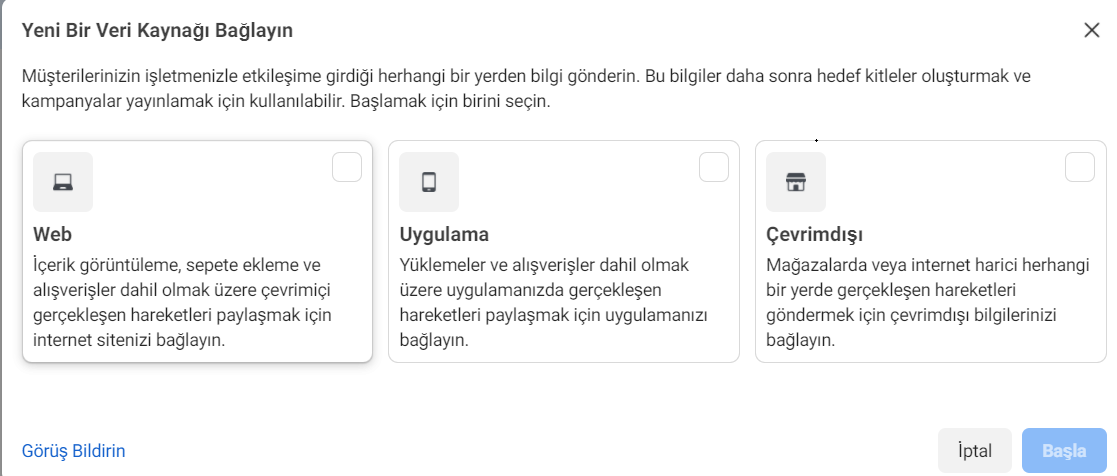
You can choose for the web or the app.
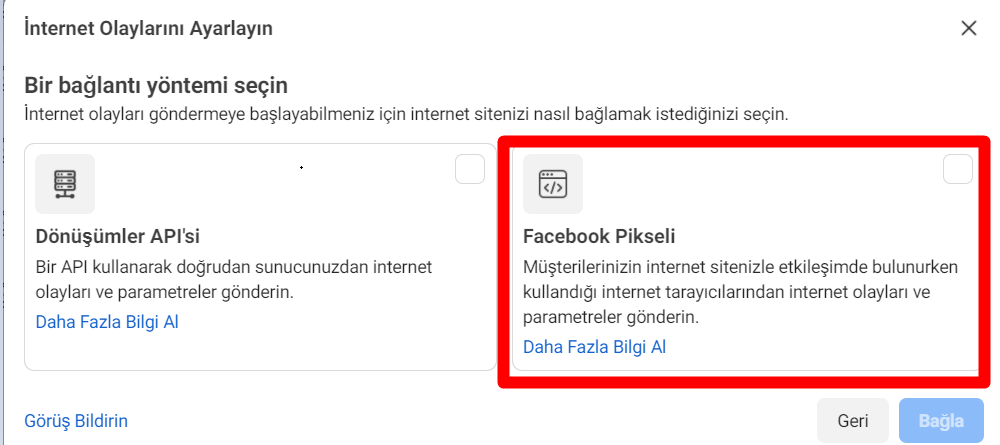
You can make the Facebook pixel selected.
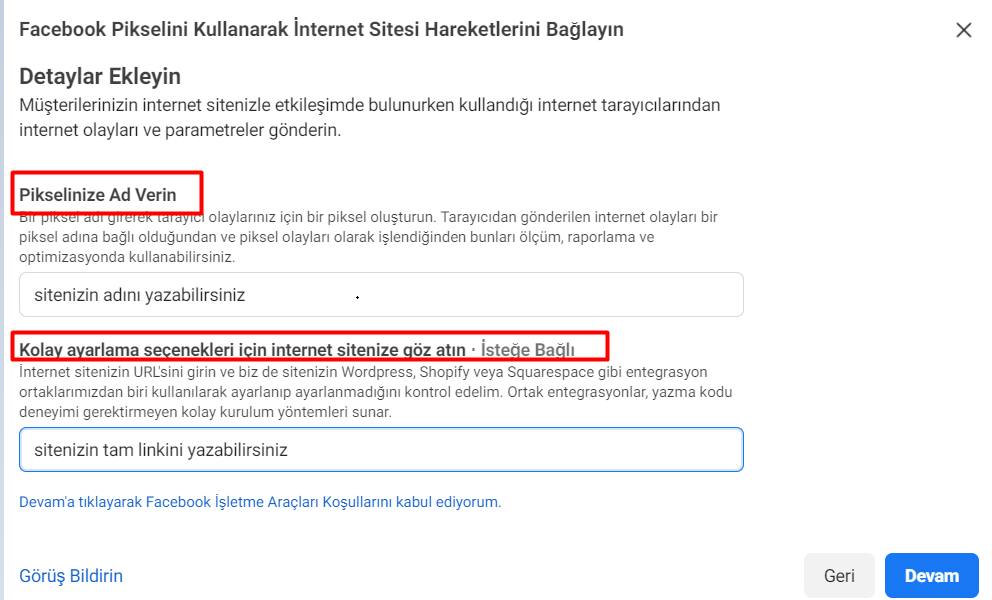
You can give your pixel a name and write the full link to your site.
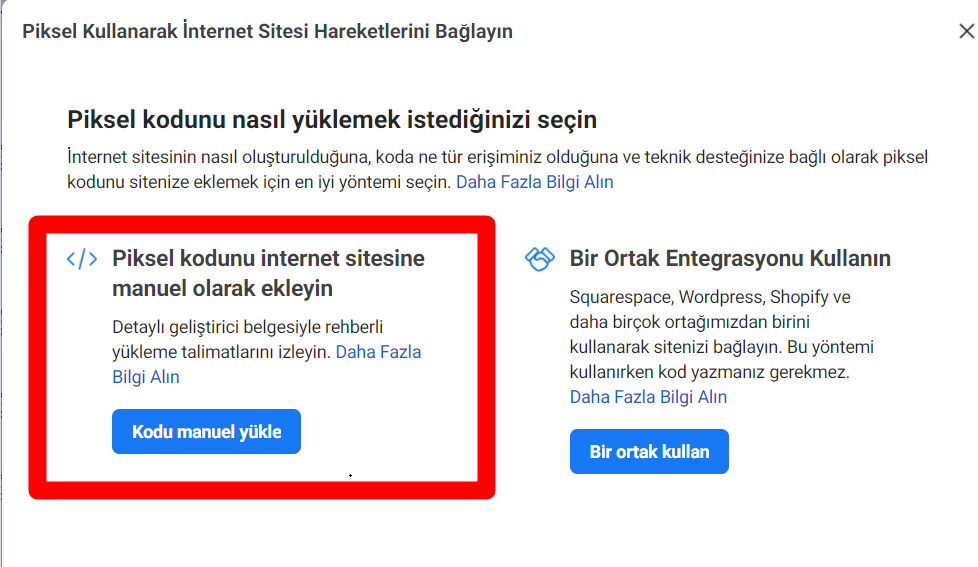
You can say install manual pixel code.
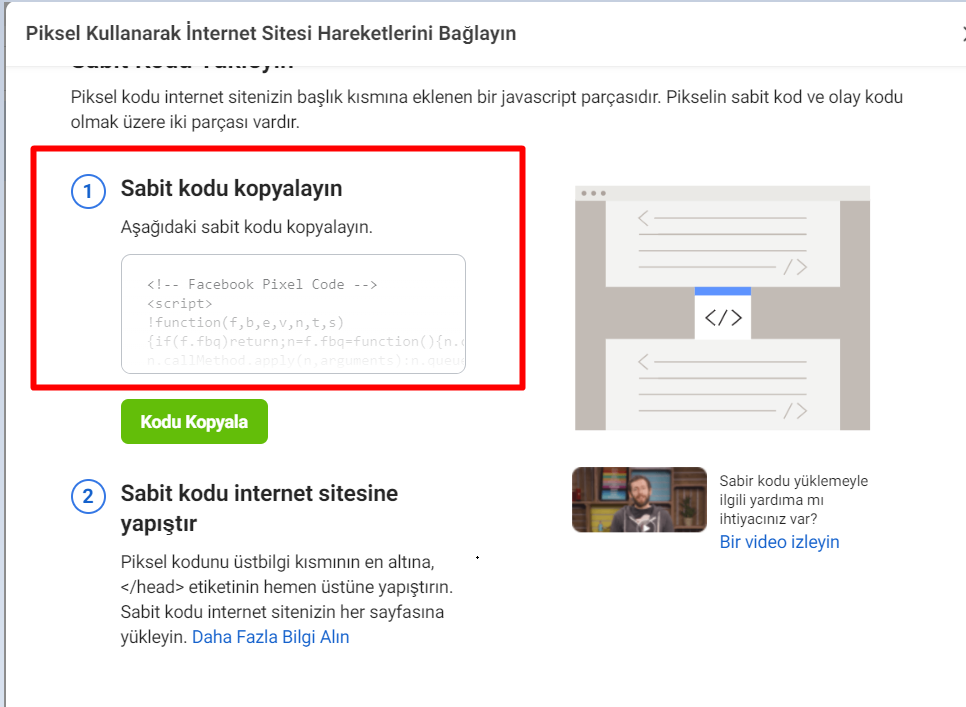
In this way, you can copy your pixel code and add it to your site.

Arif Akyüz
Content Producer & Cyber Security Expert
info@arifakyuz.com
- .bak the process of opening and importing a SQL file
- .NET Framework 3.5 installation fails
- 1. Change user password with CMD
- 2. Create users with CMD
- 3. Delete a user with CMD
- 4. Open Port Inquiry CMD
- 5. Learning external IP with CMD
- 6. Domaine Alma with CMD
- 8. Creating a Folder with CMD
- 9. Shut Down a Remote Computer with CMD
- Account keeps locking
- Active Directory Security
- Active Directory Unlock Account Permission
- Add a Program to the Right-Click Menu
- Add Google Ads conversion tracking code to WordPress
- Add Opencart Google Ads conversion tracking code (add snippets)
- Add Whatsapp order button
- Adobe Illustrator Convert Type to Vector
- ALL ARTICLES
- Allow a standard user to run an application as an administrator in Windows
- ARİF AKYÜZ – SITE CONTENT
- Articles
- Backup Policy
- BC Search for Files and Folders with CMD
- Bitlocker Commissioned
- C# XML File Data Pull, Add, Delete, Update Operations
- Centos 7 IP Switching
- Change MAC Address
- Change the ADD to WooCommerce cart post
- Cisco Router Configuration
- Cisco Switch Model Learning Command
- Cisco Switch Setup
- CMD commands
- Combine columns one after the other in Excel
- Convert Picture to Text Converting Picture to Word
- Create a table of contents in Word
- Critical Files on Linux
- Cryptolocker Extension List
- CSS icon Package
- Cyber Security Certifications
- Cybersecurity Courses Passive Information Collection
- Data recovery via formatted disk
- Define the same proxy address for all users on Terminal Servers
- Delete Files and Folders with Task Scheduler Delete a File and Folder with PowerShell
- Deleting User Profile Files with Powershell
- DHCP Fail-over on Windows Server 2019
- Directory Structure on Linux
- Diskpart
- DNS Cache Clearing
- DOWNLOAD
- Exchange version information learning command
- Exchange: Bypass Malware Filtering
- File commands on Linux
- File Permissions on Linux
- Find out which port the app is using in Windows
- Forti Firewall IP Export
- Forti IP Export
- Google Advertising
- Google Advertising with ADS
- Google DNS
- Google Tag Manager Click Tracking
- Google Tag Manager Installation Turkish Lecture
- Group policy see command CMD applied to the computer
- How to Build an E-Commerce Site
- How to configure Proton VPN on pfSense using WireGuard
- How to Create a Shortcut to a Hyper-V Virtual Machine
- How to Create Trusted Self-Signed SSL Certificates and Local Domains for Testing
- How to Find Out the Motherboard Model?
- How to install FortiGate FortiOS 7.0
- How to Make a Vector Logo with Adobe Illustrator
- How to Put Password on Word Document
- How to Stay Safe From Stealer Attacks
- How to write IPv6 as a URL
- How to: Create CSR Code Through IIS
- HPE StoreOnce Systems
- IE Prevent running First Run Wizard
- Import Google Chrome passwords
- Instagram ad account closed
- INSTAGRAM ADVERTISING TRAINING
- Internal Network Attacks
- IPv6 Proxy
- Kali Linux Installation
- LAPS Installation and Configuration
- Learning Exchange CU Info command
- Learning MAC address with IP
- List files in an Excel folder
- Log4j scan for Linux
- Log4j Scan for Windows
- Mbps to kbps Converter
- Microsoft Endpoint Manager
- Microsoft Intune EDR import Server
- Microsoft Security Compliance Toolkit 1.0
- Most used ports
- My Instagram Ad Account Has Been Closed, How Can I Open?
- Network Settings for Viritual Box Virtual Machines
- NMAP Commands
- Open the UBUNTU SSH Port
- Opencart social media icon pack
- Package Management on Linux
- Password Expiration Date AD User
- Password Policy
- Paste into Excel Filtered Cells
- PDF Encryption and PDF file encryption
- Persistent user account lockout
- Ping IPv6
- Process Management on Linux
- Pull List of Domain Admin Group Members
- Pull local admin accounts of devices in the domain with Powershell
- Pulling a List of Applications Installed on the Computer with CMD
- Random MAC Address Generation
- Random password generator
- Random Password Generator
- RDP Event Viewer ID
- Real-Time Cyber Threat Map
- Reliable and fast DNS Server List 2022
- Remove additional information, product description, and product review from the WooCommerce product page
- Remove vmware workstation encryption
- RVTools
- Samsung phone throwing rom
- Samsung tablet rom throwing
- See the open and closed ports on the Cisco switch
- Send Outlook future mail
- Server room Checklist
- Server Sustainability
- Showing the Lowest Price on Products with WooCommerce Options
- SMB Signing Disabled
- Social Engineering Attacks
- Speed test
- SQL Injection Attack
- SQL Server 2019 setup
- Switch commands
- This computer can't run windows 11 error solution
- Turn off Insecure TLS Versions
- User management on Linux
- What is a bot?
- What is Biometric Photography?
- What is EternalBlue?
- What is GRC?
- What is IPv6?
- WHAT IS NBTSTAT
- What is Penetration Testing? What is vulnerability scanning?
- What is Split Tunnel? What is Full Tunnel?
- Who reset the User's Password on AD
- Whoami commands
- Windows 10 Password Cracking Programless
- Windows 10 release history
- Windows 11 theme appearance customization
- Windows 2016 Startup Folder
- Woocommerce Closing to Shopping
- WordPress Search button removal hiding
- WordPress Whatsapp button add